HubSpot Contact Creation From Anonymous Visitor Data
- Written by
- Marcus Teil
- Published
- October 13, 2026
- Reading time
- 10 min read
What this covers
HubSpot's tracking begins the instant a visitor lands on a site: a cookie gets assigned, and the platform starts logging page views, session duration, and referral source. All of that activity attaches to an anonymous token, not to a contact record. The visitor is present in the data, but unnamed.
The record changes only when someone fills out a form. There's no backdoor through the API that lets an anonymous session become a contact without that first piece of known information.
HubSpot does offer company-level IP matching across every subscription tier, so a visit can be tied to an organization's name even without a form fill. But that match attaches activity to a company record, not to a person. A marketing manager who spends twenty minutes on a pricing page still shows up, at best, as "someone at that company. The name, the title, the email address: all of it stays missing until a form closes that gap.
What the typical B2B site loses before a form is filled
Most B2B buyers do the bulk of their research on their own, avoiding sales contact until they've nearly made up their mind. That habit, paired with HubSpot's form-first design, means the large majority of a site's visitors, including many who are seriously evaluating a purchase, leave the CRM with no record of ever having been there.
The pages that matter most are exactly the ones where this gap bites hardest. A team with no visibility into who looked at the pricing page has no way to respond to that interest at all, however fast its reps might otherwise be.
Long sales cycles make the problem compound. The colleagues who read the case studies and checked the pricing page alongside them stay invisible even after their teammate converts, leaving sales with a picture of one person's interest, not the group that's going to vote on the deal.
How person-level visitor enrichment fills the gap HubSpot leaves
Person-level visitor enrichment tools close this gap directly: they identify the individual behind an anonymous session, name, work email, job title, company, and LinkedIn profile, without waiting for a form submission, and they can write that information straight into HubSpot as a new contact record.
The identification itself rests on three combined signals. Put together, the three methods let a tool infer who is likely behind a given session, even if that person never typed anything into a form.
There are two tiers to this: company-level identification, the simpler of the two, maps an IP address to an organization and returns company name, industry, size, and location. Person-level identification goes further, returning a named individual's full name, verified work email, LinkedIn profile URL, job title, company name, company domain, company size, industry, and the specific pages that person visited along with how long they spent on each.
Match rates set the realistic expectations for either tier. Geography adds another constraint: person-level identification is largely limited to US B2B traffic because of GDPR, leaving European teams dependent on company-level tools, which carry their own structural weakness in a remote-work world, since employees browsing from home resolve to consumer ISPs rather than employer IP ranges, degrading match quality for a growing share of traffic.
The tools teams are using in 2026
The tools teams evaluate for this workflow in 2026 differ mainly on three questions: do they return a company or a named individual, how cleanly do they write into HubSpot, and is outreach built into the product or left to a separate layer.
Happierleads identifies the actual person visiting a site, name, work email, mobile number, LinkedIn profile, alongside the company, and prices on a usage basis, meaning teams pay per identified visitor. Match rates on clean B2B traffic run around 35 to 45 percent. It's a strong fit for outbound-heavy teams that want a contact-level signal they can act on the same day it arrives, though coverage outside North America is thin enough to limit its usefulness for teams with a global ideal customer profile.
Artisan takes a different approach: it combines visitor identification with automated outreach inside one product. Artisan carries SOC 2 Type II attestation and supports SSO, SAML and SCIM, role-based access, and audit logs on its Enterprise plan. Its AI BDR, named Ava, enriches leads, writes and sends outreach sequences, and answers replies to book meetings, handling the full sequence from identification to a calendar invite without much manual handoff.
A third pattern has gained ground through Clay, used not as the identification source itself but as an orchestration layer sitting downstream of one. A growing number of teams feed raw visitor data from an identification tool into Clay, which then finds the right contact at the company, verifies the email address, and pulls in recent company news before the record reaches HubSpot. This separates the act of identifying a visitor from the act of enriching that identity, letting a team mix signals from multiple sources.
You need to compare these options directly before you commit budget. Running two pixels in parallel on a low-traffic page for seven days and comparing raw output is a reasonable test. The comparison should look at person-level match rate (a named contact, not just a company), email deliverability (checked by running returned addresses through a verifier), time-to-CRM (anything over an hour starts to lose the warmth of the original visit), and total cost at actual traffic volume, since per-identified-visitor pricing can scale poorly while flat-rate plans tend to win out above a certain volume.
The standard integration architecture: pixel to HubSpot contact in four steps
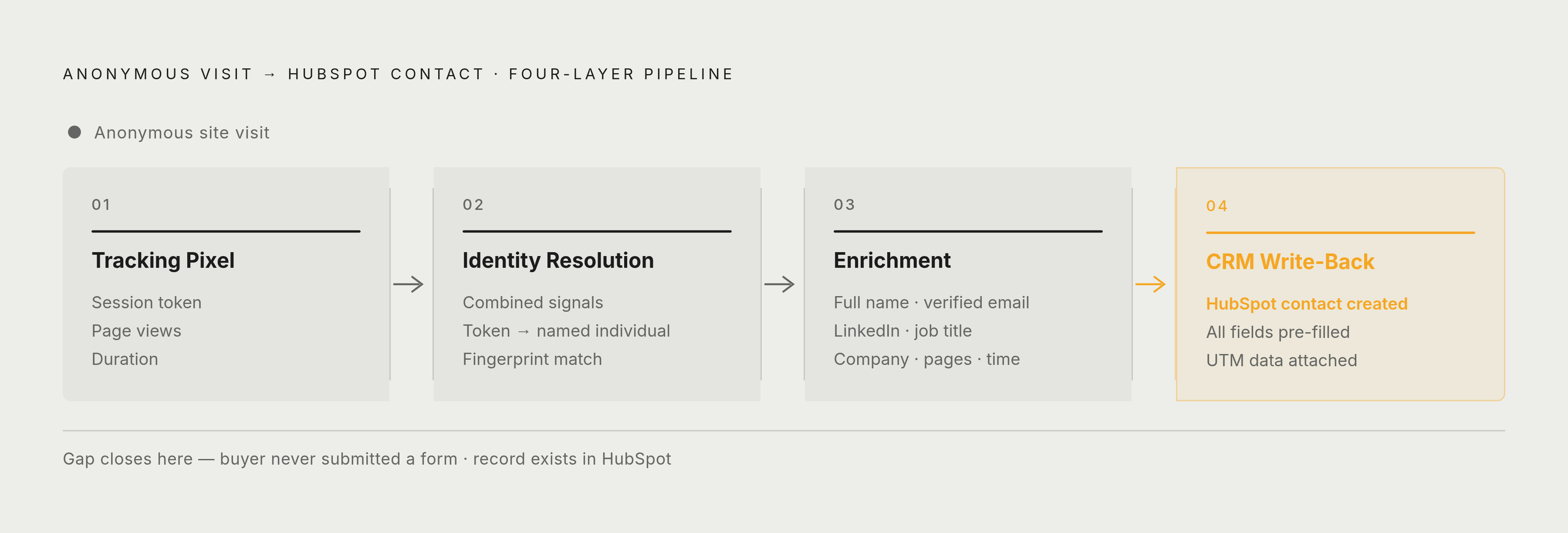
Regardless of which identification tool a team picks, the plumbing that turns an anonymous visit into a HubSpot contact follows the same four-layer architecture: tracking pixel, identity resolution, enrichment, and CRM write-back.
The fourth layer is CRM write-back, where the enriched record is written to HubSpot as a new contact, or gets matched to an existing one, with every field pre-filled. This is the step where HubSpot's native gap actually closes: the CRM now holds a record for a buyer who never submitted a form.
Respond within five minutes of a high-intent visit, because that window has the strongest effect on conversion.
A few setup details matter before any of this goes live. Internal office IP addresses need to be excluded so employee browsing doesn't inflate analytics or create junk contacts. Cross-domain tracking needs to be confirmed if the site spans more than one domain. And the pixel needs to be verified as firing on live URLs rather than inside editor previews, a detail that sounds trivial but will silently break the whole pipeline if missed.
Filtering bot traffic before it reaches HubSpot
Automated bots now make up the majority of HTML web requests as of June 2026, and that volume inflates session counts while it creates false identification signals of its own. If an enrichment pipeline doesn't filter bots before writing to HubSpot, it will fill the CRM with noise sitting right alongside real buyers.
Cloudflare CEO Matthew Prince reported that bots now generate most HTML web requests, the first time automated traffic has held that position in Cloudflare's measurement of HTML HTTP requests. AI-related categories accounted for nearly a third of verified-bot traffic in the third quarter of 2026, and AI crawlers, AI search bots, and AI assistants each behave differently from one another and from older-style scrapers, so a single blanket rule doesn't treat them consistently.
They do behave differently in practice, moving through a site more systematically and taking actions at a higher density than a typical human visitor, but user-agent filtering and IP heuristics alone aren't enough to catch them reliably. xAI's Grok crawler illustrates the problem concretely: it publishes no documentation, and multiple behavioral reports describe its retrieval traffic rotating through datacenter or proxy IP addresses while spoofing Safari or Chrome user agents, making it functionally indistinguishable from a human visitor at the user-agent layer. That means it passes basic bot filters cleanly and can generate a false identification signal that looks, on paper, like a real buyer.
Before any team starts trusting the contacts landing in HubSpot from an enrichment pipeline, the upstream filtering needs to be sound enough to keep this traffic out of the identity resolution layer.
Attributing paid media spend to the companies and individuals enrichment identifies
Beyond filling in missing contacts, person-level enrichment turns those records into an asset for measuring what ad spend actually produced. Once a visiting company or individual is known, the ad clicks that brought them to the site can be tied to real pipeline events rather than to anonymous sessions and form fills alone.
Salesforce tracks attribution only against identified records: leads, contacts, and accounts. HubSpot works the same way in practice. It does track anonymous sessions by cookie and will link that source data to a contact record once identification happens, but its formal attribution reporting ties back only to identified contacts. Anonymous sessions before a form submission stay invisible to that reporting, so if ad spend drove high-intent visits without a form fill, the reporting shows it as having produced nothing.
When an enrichment tool identifies a visitor and creates the HubSpot contact, that contact's session data, including UTM parameters and referral source, travels along with the new record. Buying committees often have several stakeholders visit before any one of them submits a form, so enrichment can surface those additional visitors as separate contacts linked to the same account, and you get a fuller picture of which campaigns actually reached the group making the decision.
Privacy compliance limits
Person-level visitor enrichment sits in genuinely contested legal territory, and the rules differ sharply by geography. US-based B2B teams have more room to operate, but teams facing EU traffic run into structural constraints that make person-level identification both legally risky and practically limited.
Company-level identification maps a session to an organization rather than to a natural person, so it generally qualifies for legitimate interest under Article 6(1)(f) of GDPR without needing individual consent, because it stops short of revealing a natural person's identity. Person-level identification is a different matter: returning a named individual's email address, LinkedIn profile, and job title involves personal data under GDPR and needs a lawful basis to process. Legitimate interest remains a possible basis, but it has to survive a balancing test, and the individuals being profiled may have no idea it's happening.
The structural tension for EU-facing teams runs in both directions at once. In the US, CCPA and CPRA require a clear "Do Not Sell or Share My Personal Information" mechanism and automatic honoring of Global Privacy Control signals, and several other states have extended similar requirements, making a consent banner that suppresses the tracking pixel for opted-out visitors a practical requirement.
Automated profiling used for outreach, such as AI-driven lead scoring or agentic customer contact, may count as high-risk processing under Article 35 of GDPR, which would trigger a requirement for a Data Protection Impact Assessment. None of this substitutes for legal counsel reviewing the specific setup; it's the set of questions counsel should be asked to answer.
Putting the workflow together: from anonymous visit to HubSpot contact to booked meeting
Teams that get real pipeline out of visitor enrichment don't treat identification as a report they check occasionally. They're running a closed loop: pixel, enriched HubSpot contact, real-time alert, rep action, with bot filtering, privacy controls, and attribution built directly into the sequence.
The first step is auditing the current gap, documenting which fields sit consistently empty on inbound HubSpot contact records, individual name, job title, LinkedIn URL, direct email, and identifying which pages generate the most anonymous traffic. Those gaps and pages set the scope for everything that follows. The second step is installing and configuring the pixel, starting on the highest-intent pages, pricing, product detail, case studies, competitor comparisons, with consent banner integration that suppresses tracking for opted-out visitors, and with internal IP ranges excluded before the pixel ever goes live.
The third step is setting bot-filtering rules, configuring the identification tool to exclude known AI crawlers, GPTBot, ClaudeBot, PerplexityBot, and comparable automated agents, along with behavioral bot detection tuned for sessions that mimic human browsing closely enough to slip past simpler filters. The fourth step is configuring enrichment and CRM write-back itself: setting ICP criteria, company size, industry, job function, that determine which visitors qualify for enrichment, then writing the enriched record into HubSpot with every field pre-filled and session behavior attached, matching it to an existing account wherever one exists.
The fifth step is setting up real-time Slack alerts, firing the moment a qualifying visitor is identified and including name, title, email, LinkedIn profile, pages visited, time on site, and whether the visit is a first or a return. The sixth step closes the attribution loop: you use the identified contacts and their session UTM data to connect ad spend to named buyers, and you update retargeting audiences to reflect who's been identified and who's already converted.
The seventh and final step is measuring and iterating: tracking the shift in form-conversion rate against a pre-enrichment baseline, counting new contacts by source, enrichment versus form, and tracking pipeline influenced by enriched contacts specifically, using realistic match-rate benchmarks to judge whether the identification tool in use is actually performing as it should. That loop, run consistently, is what turns a tracking pixel into a pipeline of named buyers who never once raised their hand.